
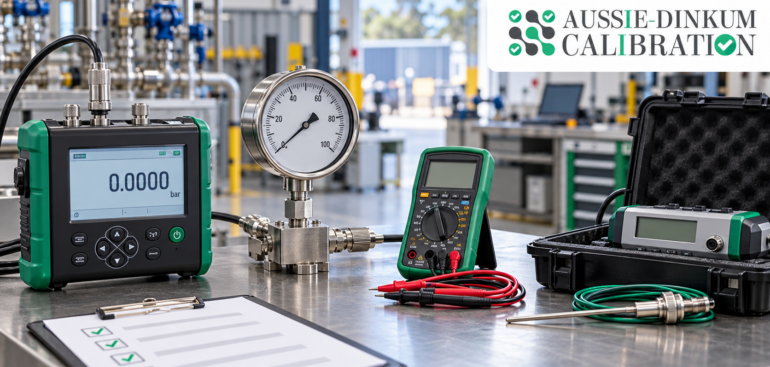
Onsite calibration services in Australia allow businesses to have suitable measuring equipment calibrated at their workplace. This approach can be useful for instruments that are difficult to transport, installed within a process or needed regularly for production and testing.
However, a successful visit requires preparation. Missing equipment, unavailable operators, unsuitable conditions or unclear testing requirements can delay the work and limit what the technician can complete.
A workplace preparation checklist helps businesses organise their instruments, coordinate access and obtain calibration records that support useful equipment decisions.
What Is Onsite Calibration?
Onsite calibration establishes the relationship between an instrument’s readings and suitable reference values at the customer’s premises. Results include the associated measurement uncertainty and help businesses understand how their instruments perform.
Depending on the provider’s capabilities and site conditions, the service may cover pressure gauges, temperature instruments, electrical measuring equipment, weighing equipment and other measurement devices.
Not every instrument or measurement range is suitable for onsite calibration. Businesses should confirm the required functions, test points and measurement uncertainty before booking.
Can Onsite Calibration Be NATA Accredited?
Calibration performed at a customer’s premises can fall within a provider’s NATA accreditation. Where accredited, the onsite activities, applicable ranges and measurement capabilities are identified in the provider’s scope of accreditation.
Businesses should check that the scope covers the particular onsite service they require. A provider’s accreditation for laboratory work does not automatically cover every activity performed at a customer’s workplace. NATA
1. Prepare an Accurate Equipment List
Start by identifying every instrument included in the visit. A complete equipment list helps the provider plan the work, bring appropriate reference equipment and estimate the time required.
Details to Include:
- Equipment name and type.
• Manufacturer and model.
• Serial number and internal asset number.
• Measurement range and functions used.
• Normal operating range or important test points.
• Equipment location and responsible department.
• Previous calibration date and certificate reference.
• Known faults, damage or unusual readings.
Check that the identification on each instrument matches the equipment register. Where an identification label is missing or unreadable, resolve the issue before the visit.
2. Agree on the Calibration Scope
An instrument may have several functions, but a standard service package may not cover all of them. For example, a multimeter may be used for voltage, resistance and current measurements, with different ranges relevant to each task.
Tell the provider how the equipment is used so that the agreed calibration points reflect the measurements that matter to your business.
Important Questions to Confirm:
- Which functions and ranges will be calibrated?
• What measurement points will be tested?
• Is the expected measurement uncertainty suitable for the application?
• Are probes, sensors, leads or displays included?
• Will the complete measurement system or individual components be tested?
• Are adjustment or repair services available if needed?
• What results and supporting information will appear in the report?
Agreeing on these details reduces the risk of receiving a certificate that does not cover the instrument’s actual use.
3. Define Acceptance Requirements Before Testing
Calibration provides measurement results. It does not automatically establish whether equipment is suitable for a particular process.
If your business needs a pass-or-fail statement, provide the relevant acceptance limits and agree on the decision rule before testing. The decision rule explains how measurement uncertainty is considered when assessing conformity.
For example, an instrument used for a narrow process tolerance may need stricter performance limits than the same instrument used for a general indication.
Information to Provide:
- Applicable manufacturer specifications.
• Internal process tolerances.
• Customer requirements, where relevant.
• The specification version or document reference.
• Any required conformity statement.
Avoid selecting acceptance limits only after seeing the results. Requirements should reflect the intended measurement task.
4. Schedule Equipment Availability and Downtime
Onsite calibration can reduce transport requirements, but equipment may still need to be taken out of service during the work.
Coordinate the appointment with production, maintenance, laboratory and quality teams. Confirm when each instrument will be available and whether a process shutdown is necessary.
Scheduling Checklist:
- Notify affected departments of the appointment.
• Reserve the agreed equipment access window.
• Arrange replacement instruments where needed.
• Allow time for setup, stabilisation and testing.
• Include time for authorised adjustment or repeat measurements.
• Confirm who can approve additional work.
For a large equipment inventory, agree on a testing sequence. Grouping instruments by location or type may make the visit easier to manage.
5. Prepare a Suitable Calibration Area
The workplace environment can influence calibration results. Temperature changes, vibration, draughts, contamination and unstable power may affect particular measurements.
NATA’s calibration criteria require providers performing accredited onsite work to ensure that conditions support valid results. Relevant considerations include environmental monitoring, separation from interfering activities and allowing reference equipment to reach thermal equilibrium. NATA
Ask the provider for the conditions required for your instruments rather than assuming that every service needs the same room temperature or setup.
Workspace Preparation Checklist:
- Provide a clean, stable work surface.
• Clear sufficient space for instruments and reference equipment.
• Arrange suitable lighting and required power connections.
• Identify nearby sources of vibration or electrical interference.
• Keep the area away from unnecessary traffic and handling.
• Confirm any temperature or humidity requirements.
• Allow the provider to assess whether the location is suitable.
Where conditions cannot support the required measurements, discuss another location or laboratory calibration.
6. Confirm Access and Site Arrangements
A technician may arrive with several cases of reference equipment. Delays at reception, restricted parking or unavailable escorts can reduce the time available for calibration.
Provide practical arrival instructions and identify a workplace contact who understands the booking.
Details to Share Before Arrival:
- Site address and correct entrance.
• Parking and unloading arrangements.
• Reception and visitor registration procedures.
• Required inductions and access permissions.
• Restricted areas and escort requirements.
• Site-specific protective equipment requirements.
• Contact details for the responsible employee.
Where equipment is installed in a controlled or restricted area, confirm access arrangements with the provider in advance.
7. Arrange Equipment Readiness and Safe Access
Equipment should be accessible and in a condition suitable for the agreed work. Tell the provider about contamination, damaged connections, leaking fittings or other issues that could affect handling or testing.
Any necessary isolation, disconnection or process preparation should be planned with the responsible site personnel and the calibration provider.
Readiness Checklist:
- Remove stored items that block access.
• Complete agreed cleaning or decontamination.
• Make relevant operating instructions available.
• Identify required permits and authorised personnel.
• Confirm responsibility for disconnection and reconnection.
• Report existing faults before testing begins.
Avoid adjusting an instrument immediately before the visit if its original condition needs to be documented. Discuss how as-found results will be preserved.
8. Gather Accessories and Previous Records
Missing accessories can prevent an otherwise straightforward calibration from proceeding.
Depending on the instrument, the provider may need dedicated probes, chargers, power supplies, test leads, adaptors, connection fittings or access software. Confirm which items the provider supplies and which must be available onsite.
Useful Records to Prepare:
- Previous calibration certificates.
• Operating manuals and relevant specifications.
• Repair and adjustment history.
• Intermediate check results.
• Records of drops, overloads or unexpected readings.
• Details of equipment configuration or software settings.
Previous results can help your team assess changes in performance and review the suitability of calibration intervals.
A Practical Workplace Preparation Checklist
Use the following checklist when coordinating an onsite calibration visit:
| Preparation item | What to confirm |
| Equipment inventory | Instrument identities, locations and quantities are correct |
| Service scope | Required functions, ranges and test points are agreed |
| Measurement requirements | Expected uncertainty is suitable for the intended task |
| Acceptance limits | Specifications and decision rules are agreed where needed |
| Equipment availability | Departments have reserved sufficient downtime |
| Workspace | Conditions, space and utilities meet the provider’s requirements |
| Site access | Arrival instructions, inductions and escorts are arranged |
| Equipment readiness | Cleaning, access and necessary preparation are complete |
| Accessories | Required probes, leads, fittings and power supplies are available |
| Documentation | Previous certificates and relevant records are ready |
| Workplace contact | A responsible employee is available during the visit |
| Reporting | Certificate details and delivery arrangements are confirmed |
What Should Happen After Calibration?
Preparation should include a plan for reviewing the results and returning equipment to service.
Check that each certificate identifies the correct instrument and covers the agreed functions and test points. Review the results, measurement uncertainty and any reported limitations.
Post-Calibration Actions:
- Review Equipment Suitability: Assess results against the requirements for the intended task.
- Investigate Unacceptable Results: Identify affected equipment and consider whether earlier measurements need review.
- Record Adjustments: Retain as-found and as-left results where adjustment was performed.
- Update Equipment Records: File certificates and update the calibration register.
- Confirm Return to Service: Complete required reconnection and operational checks.
- Review the Next Due Date: Consider usage, measurement risk, previous performance and applicable requirements.
An instrument that has been calibrated may still be unsuitable for a particular application. The results need to be assessed before continued use is authorised under the business’s equipment-control procedure.
Common Mistakes to Avoid
Several preparation mistakes can cause unnecessary delays or incomplete work.
Examples Include:
- Booking equipment without confirming its required ranges.
• Leaving instruments in use when testing is scheduled.
• Forgetting probes, adaptors or dedicated accessories.
• Providing an unsuitable workspace.
• Assuming all onsite work is covered by the provider’s accreditation.
• Requesting pass-or-fail statements without agreed limits.
• Adjusting equipment before recording its original performance.
• Filing certificates without reviewing the results.
Assigning one person to coordinate the visit can help keep these details organised.
Final Thoughts
Onsite calibration services in Australia can help businesses manage measuring equipment while reducing the need to transport suitable instruments to a laboratory.
A prepared workplace gives the provider access to the right equipment, suitable conditions and clearly defined measurement requirements. After the visit, reviewing the results and updating equipment records helps turn the calibration service into useful information for ongoing quality control.